2 min read
What's New? Peppol eInvoicing + PO Workbook Dashboard...
support@symlearning.com.au October 8, 2026
NEW Features in Sympac
New features to help you invoice, review and manage purchasing activity.
In the lead-up to our next major Software Rollout, we are introducing new features designed to make everyday work in Sympac easier.
NEW! Peppol eInvoicing & Purchase Order Workbook
Peppol eInvoicing lets you send invoices directly from Sympac to your customer's accounting system.
Our new Purchase Order Workbook dashboard feature gives you a new way to build and review purchase order lists before sending products to TBO.
Keep reading to find out more.
Peppol eInvoicing is here!
Send invoices directly from your system to your customer's system.
Imagine sending an invoice and having it arrive directly in your customer's accounting software, without emails, PDFs or manual data entry.
That's exactly what Peppol eInvoicing does.
Fully integrated with Sympac through our partnership with OZEDI, Peppol provides secure, system-to-system invoice delivery. It works with MYOB, Xero and other Peppol-enabled platforms.
Peppol eInvoicing can help reduce administration, improve accuracy and support faster invoice processing.
What does this mean for your business?
Send Peppol invoices directly from Sympac.
Reduce manual processing and data entry.
Reduce the risk of invoice scams with secure delivery between businesses.
Improve invoice accuracy and help reduce disputes.
Use the Australian Peppol standard through an ATO-approved network.
Support faster approvals and payment cycles.
Get up to speed with symlearning!
To assist with the rollout of Peppol eInvoicing, we have created a symlearning micro lesson. It steps you through the setup and configuration so you can get up to speed quickly and start using Peppol eInvoicing in Sympac. You'll find our lesson in the Debtors/Account Customers Learning Pathway on your symlearning dashboard, follow the link below to login.
Not yet on symlearning? Click 👉here to register.
NEW! Purchase Order Workbook
Build better purchase orders before they reach TBO!
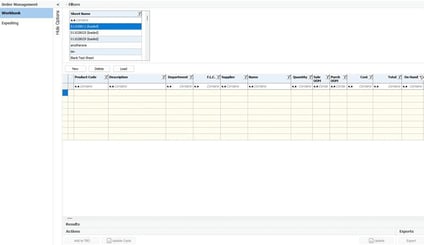
The Purchase Order Workbook gives you a place to build purchasing lists over time, check stock positions, review supplier costs and work with your team before sending products through to To Be Ordered (TBO).
Think of it as your purchasing scratchpad.
↪ Create a worksheet
↪ Save it
↪ Return to it later
↪ and only send products to TBO when you are ready
What does the Purchase Order Workbook help with?
Save purchasing plans for later.
Work on lists over multiple days without losing progress.
Review stock, customer orders and supplier costs before purchasing.
Create worksheets for different suppliers, seasons or buying campaigns.
Send only the products you need to TBO.
Work with your team on purchasing lists before they are sent to TBO.
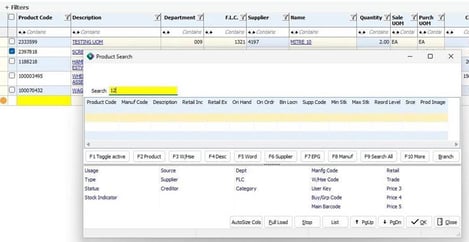
Bringing together product, supplier, stock and purchasing information in one screen, making it easier to review lines and make changes before adding products to TBO.
Get up to speed with symlearning!
To assist with the rollout of the Purchase Order Workbook, we have created a symlearning micro lesson. It shows you how to create and work with a workbook so you can get up to speed quickly and start building better purchase orders before they reach TBO. You'll find our lesson in the Purchase Ordering Learning Pathway on your symlearning dashboard, follow the link below to login.
Not yet on symlearning? Click 👉here to register.
More NEW Feature news is coming your way soon!
These features are part of our continued focus on helping customers reduce manual processes, improve visibility and make everyday workflows easier.
Keep an eye on our News Blog for more and on the news feed on your Sympac desktop!