1 min read
It’s EOFY time so we've prepared a few micro eLearning lessons and handy "how to's" so that the process run smoothly!
To ensure that your EOM (End Of Month) and EOY (End Of Year) run successfully, we suggest that you restart your Main Server in the days leading up to the 30th of June 2026. This will minimise the likelihood of any issues that may occur while this process is running.
The EOM and EOY will run automatically when you run your EOD on Tuesday, 30 June 2026. Please ensure staff working on the 30th June 2026 monitor the EOD process to reduce any potential downtime on the 1st July 2026 in your business.
Below you will find links to our range of EOFY eLearning courses and a quick checklist to make sure your EOFY runs smoothly.
EOFY eLearning Courses
Our EOFY Learning Pathway offers quick micro learning lessons as well as a full EOFY course!

Click Here to access symlearning.
Need help with symlearning? Please email support@symlearning.com.au for assistance.
EOFY Checklist after 30 June
In order to check if your EOM / EOFY has run successfully :
1. Exit out of Sympac after EOD is completed, and then go back into the software.
2. Check the main screen of Sympac on the right-hand side you'll see a box similar to the one shown* here:
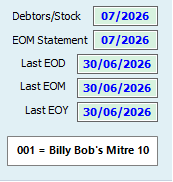 3. Ensure the Last EOM and Last EOY , Last EOD fields are all showing 30/6/2026.
4. Make sure that the Debtors/Stock and EOM Statement fields are both showing 07/2026.
*NB: this screen will be displayed after the EOD is completed on 30 June 2026
once you have exited the software and re openend Sympac.
If these steps are all correct, CONGRATULATIONS — your EOM and EOFY has successfully completed!
If you have any questions or concerns please contact the Sympac Client Services Team on 03 5649 6200 or email helpdesk@sympac.com.au. Our Help Desk team will be available from 7:00am EST to 8:00pm EST for any assistance that you may require.
EOFY After Hours Monitoring
Sympac staff will be proactively monitoring stores to ensure the EOFY process has been completed successfully.
If we identify an issue with your EOFY process, we will access your system via Splashtop to investigate and take corrective action where required.
If you have any concerns with our staff accessing your system after hours, please email helpdesk@sympac.com.au and let us know.
Need assistance?
Please contact us on 03 5649 6200. Our Client Services Team are available from 7am to 8pm EST to assist you.