 Sympac Solutions

HOT FIX Release Notes: September 2026
POS
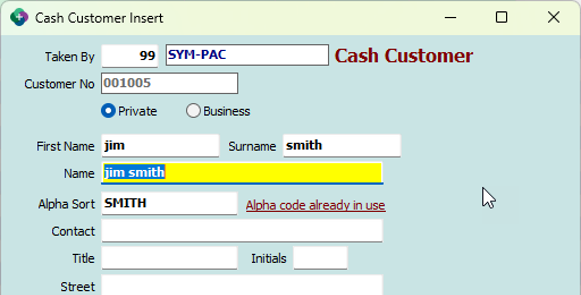
- Creating customer accounts in POS now alerts the user if the alpha code is already in use on another account
- Audit notes on a customer account now record which staff member made the change, shown in the "Rep" column in customer alter - audit notes
- Picking slips printed for customer orders now show the correct backorder quantities
- When you are delivering a lineal metre product against a customer order, the lengths on the tally are now locked and shaded, so the ordered lengths cannot be changed by mistake. You just enter the pieces you are supplying against each length.
- The "Was $..." price on dockets now correctly reflects the customer's own price level
- Stores setup to use the floor cost in the cost fields directly in POS now show the correct GP after loading a parking docket with an alternate UOS product
- Setting a price through the markup window on a quote now follows system configuration and warns you if the price is below cost and requires the password override if configured
- Lineal Metre packs listed under each location now display properly. Previously a pack row could be stretched across the whole width, hiding its tick box, description and quantities
Customers
- Monthly till reports now only include takings from the store you are running it at
- Improvements to Delivery manifest grid load time
- Detrack Proof of delivery photos and the customer's signature are now saved automatically, alongside the proof of delivery document that was already being kept. Up to ten photos per delivery are saved.
Products
- GP% figures have been added to the product alter history view below GP $
- Contract price lists now show quantity break pricing, so customers can see the benefits for quantity buys.
- Customer Price List Report now shows the one line per product and displays the correct lowest price for items on multiple contracts.
- When Send Default Label pricing to stores is enabled moving a label into the Default Queue in Label Queue Maintenance from Head Office will now communicate the updated price to the branches.
Purchase Ordering / Inwards Goods
-
Goods In Batch now obeys the "Prompt for Prices" setting. If it is set to "If Cost goes up", sell prices are only recalculated when the cost rises. Previously prices were recalculated on every receipt regardless of the setting.
- OTB automated report now obeys the default settings if applied on the report form.
Payroll
- The Super payment process stops process if the Payer Setup is incomplete
Dashboard Screens - Fixes and Tidy Up
-
The Customer Jobs, Orders, Quotes and Sales dashboards now have a "Clear Filter" button on the grid, so you can clear all your column filters in one click instead of emptying each filter box by hand.
-
An unlabelled, blank button has been removed from the bottom of the Jobs, Quotes and New/Slow/Inactive dashboards. It did nothing when clicked and was only there by accident.
-
On the Quotes screen, the "Flag Lost" option is now only available if lost quote reasons have been set up. Previously you could pick it and be shown an empty list with nothing to choose.
-
On the Quotes screen, closing the lost quote reason window with the "X" now leaves the quote alone. Previously it could still mark the quote as lost and completed.
-
The Pending Payments screen no longer shows a leftover "Loaded" time when you first open it. The load time now only appears once payments have actually been loaded
Integrations
- Sending IHG Orders for products with no buying group code now falls to sending the main APN field
System
- Dashboards - Customer Orders and Quotes Enquiry - The "Order No" search range now defaults to include everything, rather than stopping at 999.
- Updating creditors through Table Magic in a multi-store setup no longer wipes the auto contacts held against those creditors at other stores
- Emails will now send from the email address setup per email type when using Gmail or Office365
- When a service uses too much memory, it now restarts cleanly rather than stopping altogether.
Action to Take
-
Please ensure you read the information above and view/download any documentation below that supports this update.
-
Once the update has been downloaded and installed, restart your PC to ensure all changes are applied successfully.
We’re here to help!
-
If you need any assistance or have any questions please call the Sympac Help Desk on (03) 5649 6200.
-
Our Client Services Team are available from 7am to 8pm EST to assist you.
Software Version 9.01.02.10