3 min read

Why We're Making Changes to Buy In Codes
When a Buy In code is reused, costs can vary significantly from one transaction to the next depending on the supplier, item specification or purchase price.
For example, a Buy In code used for a custom door may cost $300 on one transaction and $1,500 on the next. If those costs aren't captured correctly at the transaction level, gross profit reporting can become inaccurate and product costing records can be unintentionally affected.
This enhancement focuses on ensuring that each Buy In transaction retains its own specific cost throughout the sales process, so the sale is always costed correctly.Keep reading to find out more.
What's Changing?
➡️Reused Buy In Codes Start Fresh
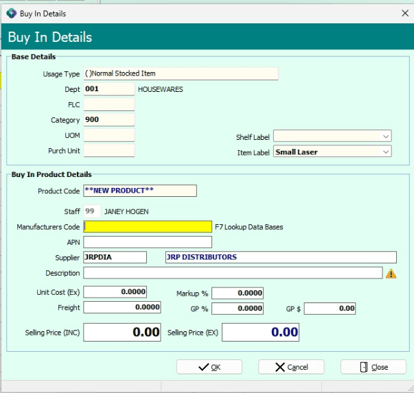
When reusing an existing Buy In code, key commercial fields will no longer carry over from the previous transaction.
The following fields will now start blank:
- Cost
- Freight
- Selling Price
- GP
Supplier and description information can still be entered, while markup defaults will continue to come from your department or sub-group settings.
This helps ensure each Buy In transaction uses current pricing information rather than historical values.
➡️Transaction Costs Stay With the Sale
A Buy In line now retains its transaction-specific cost throughout the sales process.
The cost entered for the sale flows through from:
- Quote
- Customer Order
- Invoice
This means gross profit is calculated using the actual Buy In cost associated with that transaction.
➡️Purchase Order Changes Flow Through Automatically
If a purchase order is updated or goods are received at a different cost, the revised cost will flow through to the linked customer order line, provided that line remains open.
This helps ensure costing remains accurate even when supplier pricing changes after the original order is created.
➡️Product Costs Are Protected
Reusing a Buy In code will no longer overwrite the product's:
- Average Cost
- Latest Cost
This protects your product master records while ensuring sales continue to use the correct transaction cost.
New Workflow for Reusing Buy In Codes
As part of these improvements, the process for reusing an existing Buy In code has changed.
Users will now be required to enter current transaction information before continuing with the sale. Reused Buy In codes no longer automatically return users directly to the POS grid.
While new Buy In products continue to work as they do today, staff who regularly process Buy Ins should familiarise themselves with the updated workflow before the release.

To help you get up to speed with the new Buy In costing enhancements ahead of the release, we've created a short symlearning course that walks you through:
- What's changing and why
- The new workflow for reusing existing Buy In codes
- Required fields and validation rules
- How transaction costs now flow from quote through to invoice
- Best-practice recommendations for processing Buy In products
- How the changes improve gross profit accuracy and reporting
We recommend all POS staff who regularly process Buy In products complete the course before the feature is released to ensure they're familiar with the updated process and new data entry requirements. You'll find our Buy In Cost lesson in the Inventory Learning Pathway on your symlearning dashboard, follow the link below to login.
Not yet on symlearning? Click 👉here to register.

Good to Know
-
No configuration changes are required. The enhancements will be automatically available as part of the upcoming release.
- Existing invoices are not affected.
- Orders received across multiple deliveries at different costs will use the most recently received cost.
- Supplier and Cost fields have been slightly reduced in width to accommodate the new required-field indicator.
- The changes only affect the reuse of existing Buy In codes.
- The process for creating brand-new Buy In products remains unchanged.
Better Costing. More Accurate Margins.
These enhancements ensure the correct cost stays with every Buy In transaction, giving you more accurate gross profit reporting while protecting product master costing records.
By retaining transaction-specific costs from quote through to invoice, you'll have greater confidence in the profitability of every Buy In sale.