
Get more from Sympac GO
Mobility that fits how your team works - sales, stocktakes, product and price management — all in the palm of your hand.
Let's take a detailed look...
Sympac GO
Your mobile toolkit for everyday store tasks
Sympac GO puts helpful Sympac tools in your team’s hands while they are out on the floor, in the yard or working through stock. It is designed to help staff find the information they need and complete key tasks without needing to return to the main POS terminal each time.
How Sympac GO can fit into a normal day
Helping a customer
Search or scan the product, check the information needed, then begin a sale if the customer is ready to purchase.
Completing a stocktake
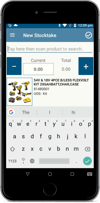
Open a new stocktake, scan or search for the product, enter the count and move on to the next item.
Handling an account sale
Process the account transaction, capture the customer signature on the device where required, then complete the sale.
Checking a parked sale
Open Parked Dockets and return to the transaction when the customer is ready to continue.
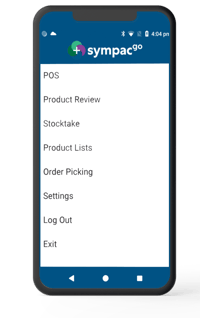
Start with the task you need to do
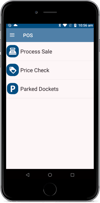
The Sympac GO home screen gives staff quick access to three everyday options:
-
Process Sale — start a sale while you are with the customer.
-
Price Check — search or scan an item to check product and price information.
-
Parked Dockets — pick up a sale that has been put on hold.
This makes it easy to move straight into the job at hand, whether that is helping a customer, checking a price or returning to a sale that needs to be finished.
Help customers while you are already with them
When a customer asks a question, Sympac GO lets staff check the details there and then.
-
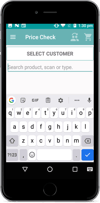
Use Price Check to search by product name, scan an item or enter a product code.
-
Check product details and pricing for a customer on the shop floor or in the yard.
-
By selecting Process Sale you can begin the transaction from the mobile rather than going back to the counter first.
-
Parked dockets - If a customer needs to collect more items or a sale is interrupted, the sale can be parked and returned to later through Parked Dockets.
Support account sales away from the counter
-
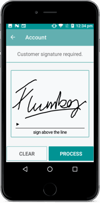
Sympac GO can be used for account transactions where a customer signature is required.
-
Hand your device to the customer to capture their signature before the transaction is processed.
-
This keeps the signature step within the normal sales process while allowing the transaction to be handled away from a fixed POS location.
Complete Stock Work as you go
Use Sympac GO for everyday stock work. Work through stock-related tasks while your are in the area where the stock is held.
-
Use New Stocktake to scan or search for products and enter the counted quantity on the device.
-
The same product lookup tools can be used when checking a product, confirming pricing or helping a customer locate an item.
-
Stock adjustments - can be completed from the device, helping you record changes as they are identified rather than waiting until they return to a desktop or counter terminal.
Already using Sympac GO?
Here's a few handy things to remember!
-
Sympac GO is fully integrated and designed to work alongside your normal POS and back-office processes.
-
It's important to make sure each team member has the appropriate Sympac access for the tasks they need to complete.
-
Use the device as part of your existing workflows for sales, stocktake and stock-adjustment procedures.
-
For the best experience, make Sympac GO part of the team’s normal routine — especially for product lookups, customer enquiries and stock work away from the counter.
-
Keep building your Sympac GO skills with symlearning - Take our Sympac GO eLearning courses on symlearning.
Our Stocktake with SympacGO course is available now and shows your team how to complete stocktake tasks using Sympac GO:
👉 Start the SympacGO Stocktake course
A full Sympac GO module will also be released in November 2026, covering the full range of Sympac GO features and everyday workflows - so keep an eye out on your symlearning dashboard and our news blog for when it's released.
One of our favourite features is Sympac Go!
Rach in our Paint Department has her Sympac Go on her all day.
Laura Murphy
Murphy's Mitre 10
Need help or want to know more?
To find out more about Sympac GO, call our Sales Team on 1800 796 722.
For help using Sympac GO, please call the Sympac Help Desk on (03) 5649 6200.
Sympac Solutions Pty Ltd
2/6 Neilson Crt, Warragul VIC 3820
Rec: (03) 5649 6200
Sales: 1800 796 722