These are the basic steps to follow to receipt electronic purchase orders in the Sympac system.
Using Inwards Goods AUTO
-
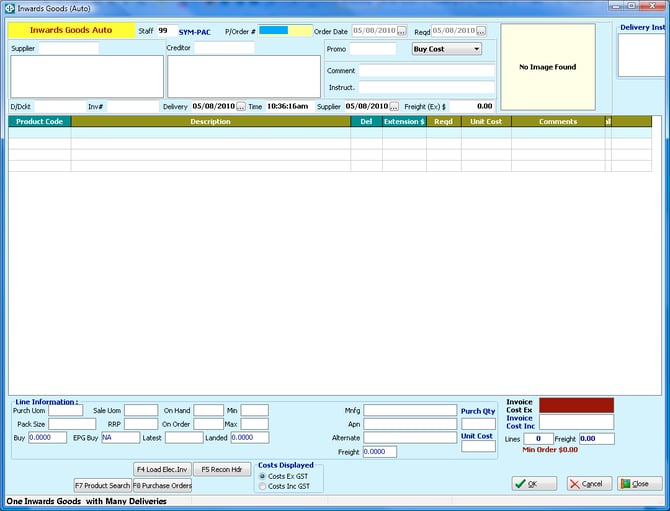
Select the appropriate inwards goods program - these steps are for Inwards Goods Auto.
-
Enter Staff ID Number.
-
Load Electronic Invoices:
- Select the F4 option labeled "Load Elec. Invoices" in the Order No field.
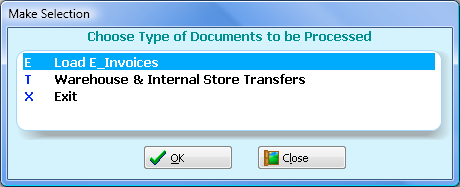
- In the "Make Selection" window, choose option E ("Load E_Invoices") and click OK.
-
View Latest Invoices:
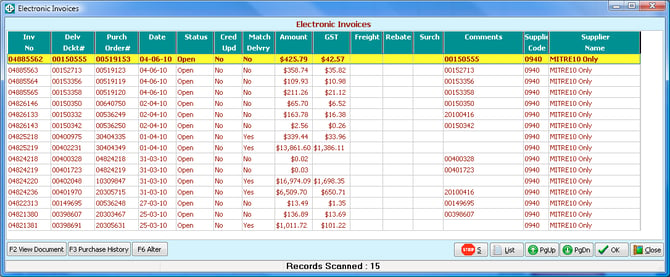
- The "Electronic Invoices" listing window will display the latest invoices first.
- Highlight the invoice you wish to load and click OK.
- In the "Load Invoices" window, choose the invoice you want to process.
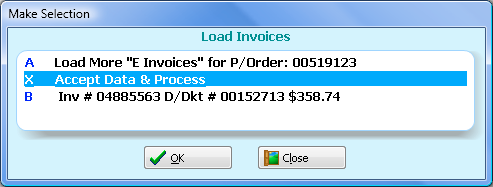
- If needed, you can select additional invoices by repeating these steps.
-
Accept and Process Data:
- Once all desired invoices are selected, choose the option [Accept Data and Process].
- The system will automatically enter all order details into the inwards goods program.
Here's an alternate way to do the process
In the selected Inwards Goods Program - we are using Inwards Goods Auto in this example:- Select the F4 "Load Elec. Inv" function button at the bottom of the inwards goods screen

- This will load all products from the invoices into the inwards goods program.
- Alter quantities to match the actual received quantities.
- Follow the usual inwards goods procedures, including handling customer order and price alteration prompts.
You can find more detailed instructions on symlearning together with video based tutorials and quick reference guides to download.
Follow this link and login to access our Goods Inwards CoursesWe have a variety of microlearning courses which are perfect for refresher/upskill training as well as comprehensive full course with certifications!