About timber group product sales
Timber Groups are designed for managing timber products with varying cost prices and selling methods. Stores may purchase timber lengths at different costs and sell them at different prices. Timber Groups require prior setup of products using the Product Insert Function. Defined lengths and other settings must be established before creating Timber Groups.
To process a sale involving timber group products, follow these steps
- Open POS and enter your staff ID
- For cash sales, simply press enter. For account sales, search for the account and select it.
- In the product code field, either type the product code or select it from the search options.
- Input the lengths of the pieces for the timber products as shown here in our screenshot example
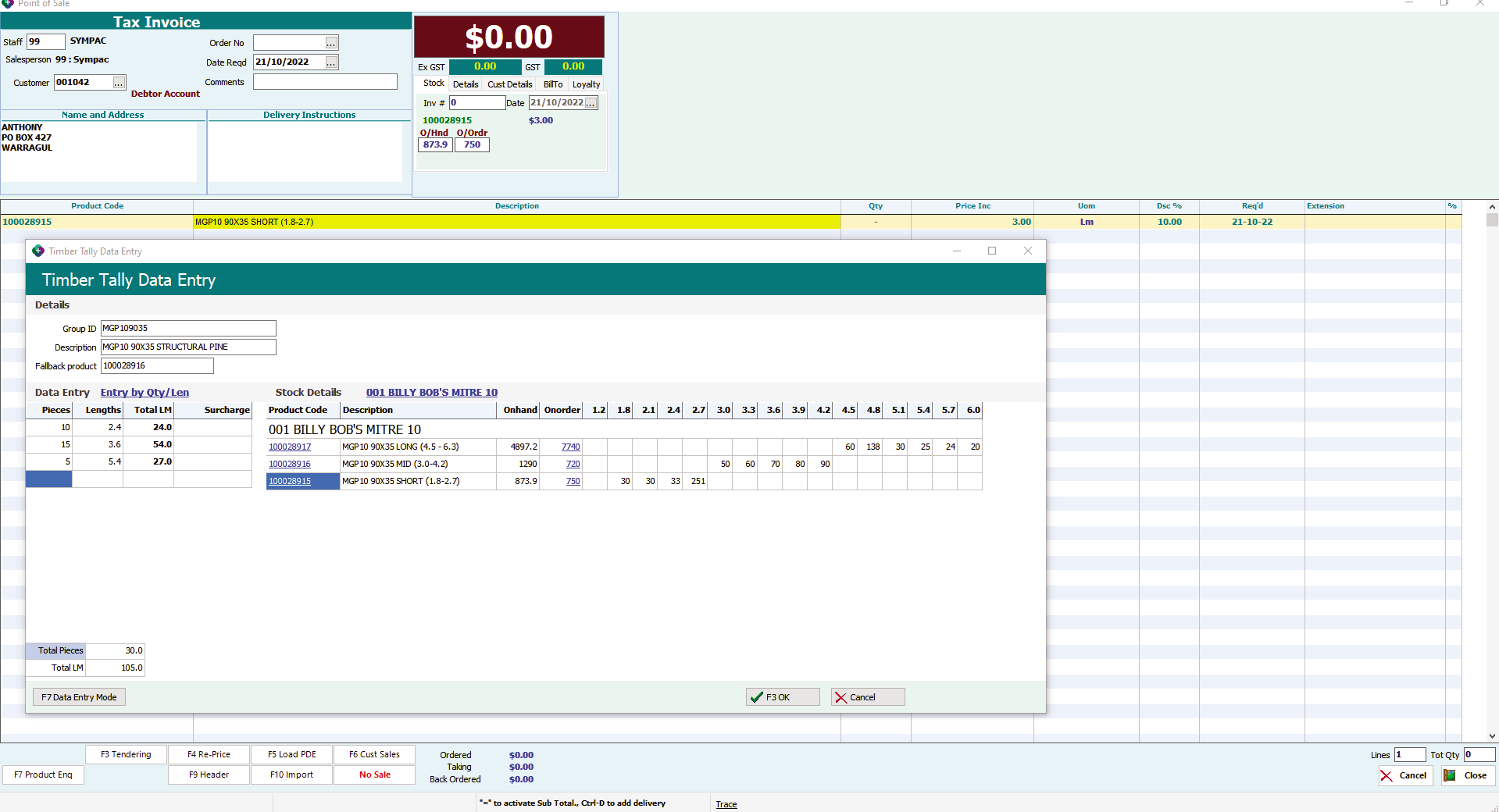
- Click F3 to confirm and add the products to the POS screen.
- Click OK in the POS to finalise and process the sale.
- Proceed to the normal POS tender screen to take payment and provide a receipt to the customer.
You can find more detailed instructions on symlearning together with video based tutorials and quick reference guides to download.
Follow this link and login to access our Trade Specific CoursesWe have a variety of microlearning courses which are perfect for refresher/upskill training as well as comprehensive full course with certifications!