Here are the general steps for a basic sale on a Trade Account:
Remember that Trade Accounts are referred to as Customer or Debtor Accounts in the Sympac system!
Here are the first 3 steps you need to take:
- First verify the customer's authority to use the account before proceeding.
- Next, Load POS and enter your Staff ID and password if needed.
- Now enter customer account number or search using various identifiers (name, phone, email). You can type in the customer's name for example and then select them from the list as shown here in our screenshot.
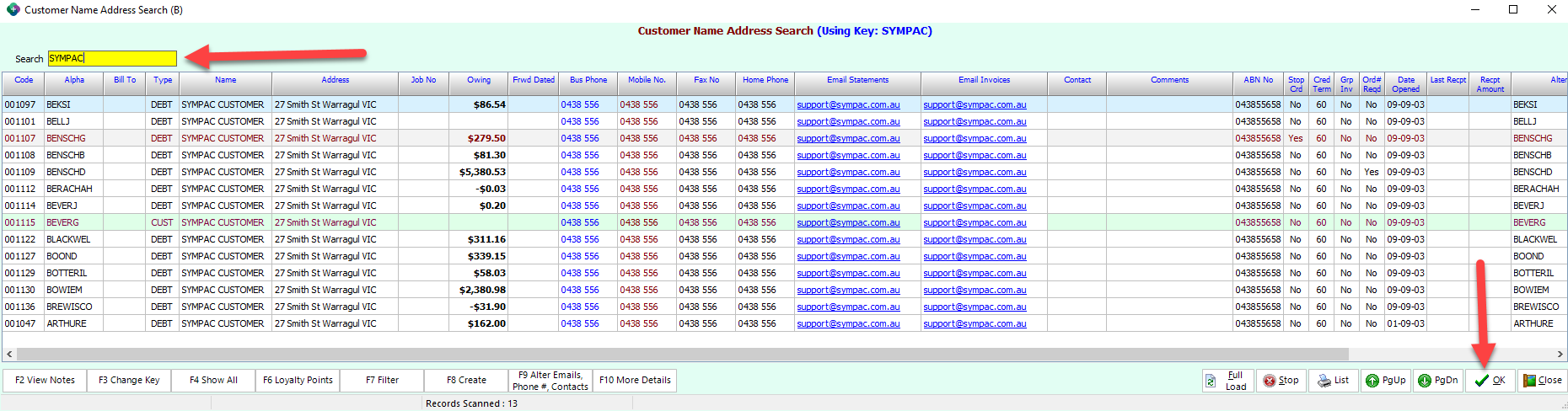
It is important to always confirm the correct account before proceeding.
Now follow these 5 final steps to process the sale:
- Enter order/job number if prompted.
- Scan or search for items, update quantities, and complete the sale.
- Select the processing option, typically "Process & Print Tax Invoice."
- To reprint an invoice, access the main screen and select F2 Reprint.
- Choose F2 Reprint Last Invoice to print the document from the default printer.
You can find more detailed instructions on symlearning together with video based tutorials and quick reference guides to download.
- Follow this link and login to access our Trade Specific Courses
We also have a variety of microlearning courses which are perfect for refresher/upskill training!